Optimization Using a Surrogate Model
This sample demonstrates how to use Femtet to create training data and optimize using surrogate models.
Sample Files
Note
Keep the sample project,
sample script 1
to create training data with Femtet and
sample script 2
to make a surrogate model without Femtet and optimize
on same folder.
How to run this Sample
When you double-click on gal_ex13_create_training_data.py, the creation of training data for the surrogate model using Femtet will begin.
Once the number of Femtet analysis executions exceeds approximately 100, please double-click on gal_ex13_optimize_with_surrogate.py to run it. (The optimization results at the bottom of the page are based on a model created from 100 analysis data points.)
Note
Since the surrogate model optimization requires no Femtet execution, you can run gal_ex13_optimize_with_surrogate.py during running gal_ex13_create_training_data.py without any additional Femtet license.
Tip
What’s Surrogate Model?
The surrogate model handled by PyFemtet is a machine learning model that predicts values of the objective function for unknown design variables by learning a set of known design variables and objective functions.
Generally, to create high-quality training data, more FEM analysis data is required than what is typically needed for regular optimization, as mentioned in the examples. However, once training data has been created, it allows for very fast calculations of the objective function.
Therefore, in situations where the items for design variables and objective functions are somewhat fixed and problems frequently arise with varying ranges or target values, it becomes possible to quickly approximate design variables that meet desired target values.
Note
For details on the FEM problem, please refer to FemtetHelp / Examples / Stress Analysis / Example 13.
Design Variables
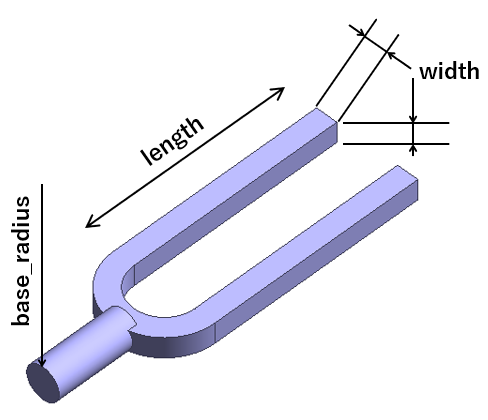
Appearance of the Model
Variable Name |
Description |
|---|---|
length |
Length of the tuning fork |
width |
Thickness of the tuning fork |
base_radius |
Thickness of the base (fixed in optimization) |
Objective Function
First resonance frequency (aim to 1000 and 2000)
Sample Code
 1import os
 2from time import sleep
 3
 4from optuna.samplers import RandomSampler
 5
 6from pyfemtet.opt import FEMOpt, FemtetInterface, OptunaOptimizer
 7
 8
 9def get_res_freq(Femtet):
10    Galileo = Femtet.Gogh.Galileo
11    Galileo.Mode = 0
12    sleep(0.01)
13    return Galileo.GetFreq().Real
14
15
16if __name__ == '__main__':
17
18    os.chdir(os.path.dirname(__file__))
19
20    # Connect to Femtet.
21    fem = FemtetInterface(
22        femprj_path='gal_ex13_parametric.femprj',
23    )
24
25    # Initialize the optimization object.
26    # However, this script is not for optimization;
27    # instead, it is for creating training data.
28    # Therefore, we will use Optuna's random sampling
29    # class to select the design variables.
30    opt = OptunaOptimizer(
31        sampler_class=RandomSampler,
32    )
33
34    # We will set up the FEMOpt object.
35    femopt = FEMOpt(
36        fem=fem,
37        opt=opt,
38    )
39
40    # Set the design variables.
41    femopt.add_parameter('length', 0.1, 0.02, 0.2)
42    femopt.add_parameter('width', 0.01, 0.001, 0.02)
43    femopt.add_parameter('base_radius', 0.008, 0.006, 0.01)
44
45    # Set the objective function. Since this is random
46    # sampling, specifying the direction does not affect
47    # the sampling.
48    femopt.add_objective(fun=get_res_freq, name='First Resonant Frequency (Hz)')
49
50    # Create the training data.
51    # If no termination condition is specified,
52    # it will continue creating training data until
53    # manually stopped.
54    # To refer to history_path in the optimization script, we will
55    # specify a clear CSV file name.
56    femopt.set_random_seed(42)
57    femopt.optimize(
58        history_path='training_data.csv',
59        # n_trials=100
60    )
  1import os
  2
  3from optuna.samplers import TPESampler
  4
  5from pyfemtet.opt import FEMOpt, OptunaOptimizer
  6from pyfemtet.opt.interface import PoFBoTorchInterface
  7
  8
  9def main(target):
 10
 11    os.chdir(os.path.dirname(__file__))
 12
 13    # Instead of connecting with Femtet, create
 14    # a surrogate model. Read the CSV file created
 15    # by the training data creation script to build
 16    # the surrogate model.
 17    fem = PoFBoTorchInterface(
 18        history_path='training_data.csv'
 19    )
 20
 21    # Set up the optimization object.
 22    opt = OptunaOptimizer(
 23        sampler_class=TPESampler,
 24    )
 25
 26    # Set up the FEMOpt object.
 27    femopt = FEMOpt(
 28        fem=fem,
 29        opt=opt,
 30    )
 31
 32    # Set up the design variables.
 33    # The upper and lower limits can differ from
 34    # those in the training data creation script,
 35    # but please note that extrapolation will
 36    # occur outside the range that has not been
 37    # trained, which may reduce the prediction
 38    # accuracy of the surrogate model.
 39    femopt.add_parameter('length', 0.1, 0.02, 0.2)
 40    femopt.add_parameter('width', 0.01, 0.001, 0.02)
 41
 42    # If there are parameters that were set as
 43    # design variables during training and wanted
 44    # to fix during optimization, specify only the
 45    # `initial_value` and set the `fix` argument True.
 46    # You cannot add design variables that were not
 47    # set during training for optimization.
 48    femopt.add_parameter('base_radius', 0.008, fix=True)
 49
 50    # Specify the objective functions set during
 51    # training that you want to optimize.
 52    # You may provide the fun argument, but it will
 53    # be overwritten during surrogate model creation,
 54    # so it will be ignored.
 55    # You cannot use objective functions that were
 56    # not set during training for optimization.
 57    obj_name = 'First Resonant Frequency (Hz)'
 58    femopt.add_objective(
 59        name=obj_name,
 60        fun=None,
 61        direction=target,
 62    )
 63
 64    # Execute the optimization.
 65    femopt.set_random_seed(42)
 66    df = femopt.optimize(
 67        n_trials=50,
 68        confirm_before_exit=False,
 69        history_path=f'optimized_result_target_{target}.csv'
 70    )
 71
 72    # Display the optimal solution.
 73    prm_names = femopt.opt.history.prm_names
 74    obj_names = femopt.opt.history.obj_names
 75    prm_values = df[df['optimality'] == True][prm_names].values[0]
 76    obj_values = df[df['optimality'] == True][obj_names].values[0]
 77
 78    message = f'''
 79===== Optimization Results =====
 80Target Value: {target}
 81Prediction by Surrogate Model:
 82'''
 83    for name, value in zip(prm_names, prm_values):
 84        message += f'  {name}: {value}\n'
 85    for name, value in zip(obj_names, obj_values):
 86        message += f'  {name}: {value}\n'
 87
 88    return message
 89
 90
 91if __name__ == '__main__':
 92    # Using the surrogate model created from the training data,
 93    # we will find a design that results in a resonant frequency of 1000.
 94    message_1000 = main(target=1000)
 95
 96    # Next, using the same surrogate model,
 97    # we will find a design that results in a resonant frequency of 2000.
 98    message_2000 = main(target=2000)
 99
100    print(message_1000)
101    print(message_2000)
Execution Result of the Sample Code

Optimization result (target: 1000 Hz)
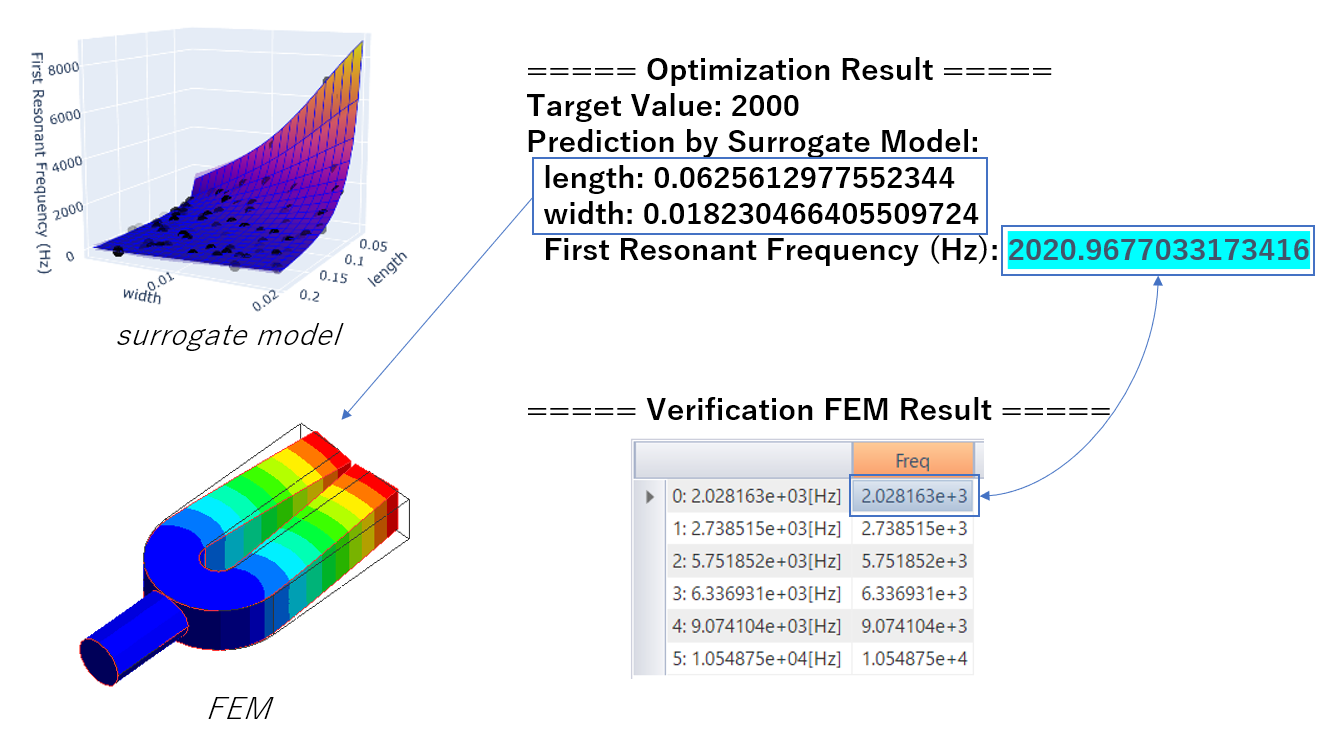
Optimization result (target: 2000 Hz)
The design variables for a tuning fork with first resonance frequencies of 1000 or 2000 were explored using a surrogate model. The resulting design variables are listed in the upper right corner of the figure.
Using these design variables, we recreated the model in Femtet and executed analyses, with results shown in the lower right corner of each figure, allowing for comparison between the surrogate model and FEM results.