Parametric Output as Objective
This example explains how to use the output settings of parametric analysis of Femtet as objective functions.
Motivation
With PyFemtet, you can perform optimization with low code. However, you have to code the objective function by using Femtet Python Macro. With this function, you can use the results set on the Femtet GUI as the objective function for optimization without coding the objective function.
Sample Files
Note
Keep the sample project
open in Femtet and double-click on the sample code
to execute it.
Note
For details on the FEM problem, please refer to FemtetHelp / Examples / Magnetic Analysis / Example 12.
Note
Warning
This feature;
removes existing sweep table of parametric analysis from your project file.
uses only the first component of the vector / complex output (e.g. X component / real part.).
Design Variables and Analysis Conditions

Model appearance, analysis conditions and design variables
Variable Name |
Description |
|---|---|
out_radius |
The radius of outer coil. |
in_radius |
The radius of inner coil. |
Objective Function
mutual inductance (aim to 150 nH)
Z component of magnetic field at the center of the coils (minimize)
Sample Code
 1"""Optimization using parametric analysis output settings as the objective function
 2
 3This demo shows how to use the values outputted by Femtet's parametric
 4analysis output setting feature as the objective function for optimization.
 5This feature allows you to perform optimization without coding the objective function.
 6
 7
 8Note:
 9
10    Please be aware of the following when using this feature.
11
12    - The sweep table from the parametric analysis will be deleted.
13    - Output settings that produce complex numbers or vectors will only use
14      the first value as the objective function. (For complex numbers, it will be
15      the real part, and for vector values, it will be components such as X.)
16
17
18Corresponding project: gau_ex12_parametric.femprj
19
20"""
21
22from pyfemtet.opt import FEMOpt, FemtetInterface
23
24
25if __name__ == '__main__':
26
27    # Initialize an object to connect to
28    # Femtet for referencing Femtet settings.
29    fem = FemtetInterface()
30
31    # Set the output settings of the parametric analysis as the objective function.
32    # `number` is the index from the `results output settings` tab of the
33    # Femtet parametric analysis dialog, and `direction` is
34    # the goal of that objective function (similar to FEMOpt.add_objective).
35
36    # Mutual inductance
37    fem.use_parametric_output_as_objective(number=1, direction=1.5e-7)
38
39    # Strength of magnetic field at the center of the coil
40    fem.use_parametric_output_as_objective(number=2, direction='minimize')
41
42    # Initialize optimization object.
43    # Pass in the previously initialized fem object.
44    femopt = FEMOpt(fem=fem)
45
46    #  Set parameters.
47    femopt.add_parameter('in_radius', 10, 5, 10)
48    femopt.add_parameter('out_radius', 20, 20, 25)
49
50    # Execute optimization.
51    femopt.set_random_seed(42)  # Fix random seed
52    femopt.optimize(n_trials=20)
Execution Result of the Sample Code

Execution result of gau_ex12_parametric.py. There is no codes about objective function calculation but the optimization correctly uses the output settings as its objective functions.
Note
Results may vary slightly depending on the versions of Femtet, PyFemtet, and the optimization engine it depends on.
(Reference) How to Set Output on Femtet

Open the dialog from here.
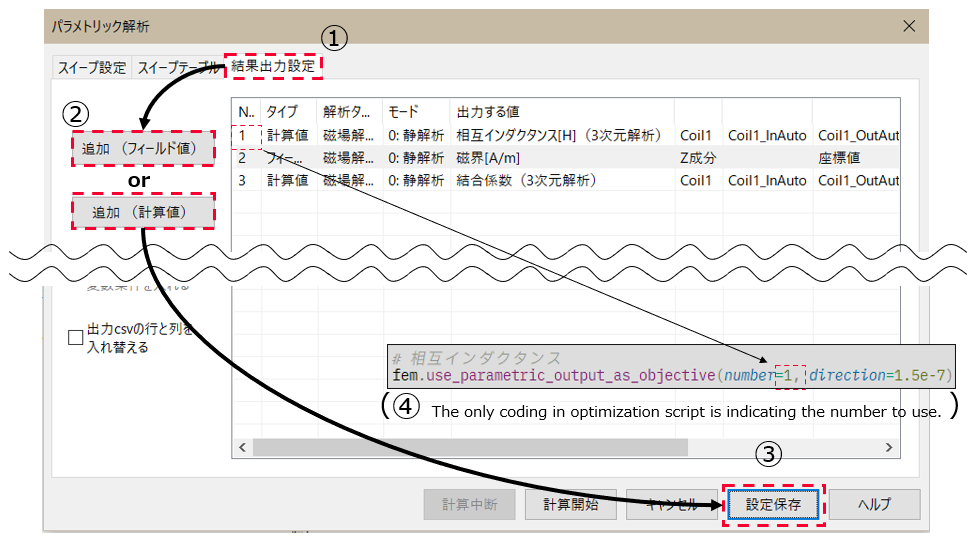
Open ‘output’, press ‘add’, (then choose items you want to get as output,) and press ‘save’.
For more detail, see the Femtet’s help.