External CAD (NX) Integration
PyFemtet allows parametric optimization even for analysis models created with external CAD (NX) and imported into Femtet.
Sample File
Note
Place the
sample model
and
sample project
in the same folder.
Keep the project open in Femtet, then double-click on the
sample code
to execute it.
Details as a FEM Problem

Appearance of the Model (and Analysis Conditions)
fix … Fully Fixed
load … Load in the -Z direction (1N)
mirror … Symmetrical to the XZ plane
Design Variables
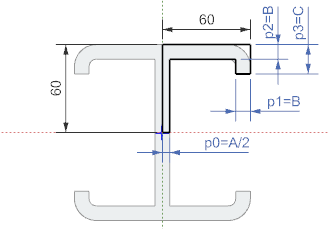
Appearance of the Model Section (and Design Variables)
Variable Name |
Description |
|---|---|
A |
Web Tickness |
B |
Flange Tickness |
C |
Flange Bending |
Objective Function
Maximum Displacement in the Z direction (set to 0)
Volume (minimize)
Sample Code
  1"""External CAD (NX) Integration
  2
  3Using Femtet's stress analysis solver and Siemens' CAD software NX,
  4design a lightweight and high-strength H-shaped beam.
  5
  6As a preliminary step, please perform the following procedures:
  7- Install NX
  8- Create a C:\temp folder
  9    - Note: NX will save a .x_t file in this folder.
 10- Place the following files in the same folder:
 11    - cad_ex01_NX.py (this file)
 12    - cad_ex01_NX.prt
 13    - cad_ex01_NX.femprj
 14"""
 15
 16import os
 17
 18from win32com.client import constants
 19
 20from pyfemtet.opt import FEMOpt
 21from pyfemtet.opt.interface import FemtetWithNXInterface
 22from pyfemtet.opt.exceptions import ModelError
 23
 24
 25here, me = os.path.split(__file__)
 26os.chdir(here)
 27
 28
 29def von_mises(Femtet):
 30    """Obtain the maximum von Mises stress of the model.
 31
 32    Note:
 33        The objective or constraint function should take Femtet
 34        as its first argument and return a float as the output.
 35
 36    Warning:
 37        CAD integration may assign boundary conditions to unintended locations.
 38
 39        In this example, if the boundary conditions are assigned as intended,
 40        the maximum z displacement is always negative.
 41        If the maximum displacement is not negative, it is assumed that
 42        boundary condition assignment has failed.
 43        Then this function raises a ModelError.
 44
 45        If a ModelError, MeshError, or SolveError occurs during optimization,
 46        the optimization process considers the attempt a failure and skips to
 47        the next trial.
 48    """
 49
 50    # Simple check for the correctness of boundary conditions.
 51    dx, dy, dz = Femtet.Gogh.Galileo.GetMaxDisplacement_py()
 52    if dz >= 0:
 53        raise ModelError('Assigning unintended boundary conditions.')
 54
 55    # Von Mises stress calculation.
 56    Gogh = Femtet.Gogh
 57    Gogh.Galileo.Potential = constants.GALILEO_VON_MISES_C
 58    succeed, (x, y, z), mises = Gogh.Galileo.GetMAXPotentialPoint_py(constants.CMPX_REAL_C)
 59
 60    return mises
 61
 62
 63def mass(Femtet):
 64    """Obtain model mass."""
 65    return Femtet.Gogh.Galileo.GetMass('H_beam')
 66
 67
 68def C_minus_B(Femtet, opt):
 69    """Calculate the difference between C and B dimensions.
 70
 71    Another example uses the following snippet to access design variables:
 72
 73        A = Femtet.GetVariableValue('A')
 74
 75    However, when performing CAD integration, this method does not work
 76    because the variables are not set in the .femprj file.
 77
 78    In CAD integration, design variables are obtained in the following way.
 79
 80        # How to obtain a dictionary with the variable names of parameters
 81        # added by add_parameter() as keys.
 82        params: dict = opt.get_parameter()
 83        A = params['A']
 84
 85    Or
 86
 87        # How to obtain an array of values of parameters added in the order
 88        # by add_parameter().
 89        values: np.ndarray = opt.get_parameter('values')
 90        A, B, C = values
 91
 92    Objective functions and constraint functions can take arbitrary variables
 93    after the first argument.
 94    The FEMOpt member variable `opt` has a method called get_parameter().
 95    This method allows you to retrieve design variables added by add_parameter().
 96    By taking `opt` as the second argument, you can execute get_parameter()
 97    within the objective or constraint function to retrieve design variables.
 98    """
 99    A, B, C = opt.get_parameter('values')
100    return C - B
101
102
103if __name__ == '__main__':
104
105    # Initialize NX-Femtet integration object.
106    # At this point, Python is connected to the Femtet.
107    fem = FemtetWithNXInterface(
108        prt_path='cad_ex01_NX.prt',
109        open_result_with_gui=False,  # To calculate von Mises stress, set this argument to False. See Femtet Macro Help.
110        export_curves=False,
111        export_surfaces=False,
112        export_solids=True,
113        export_flattened_assembly=False,
114    )
115
116    # Initialize the FEMOpt object.
117    # (establish connection between the optimization problem and Femtet)
118    femopt = FEMOpt(fem=fem)
119
120    # Add design variables to the optimization problem.
121    # (Specify the variables registered in the .prt file.)
122    femopt.add_parameter('A', 10, lower_bound=1, upper_bound=59)
123    femopt.add_parameter('B', 10, lower_bound=1, upper_bound=40)
124    femopt.add_parameter('C', 20, lower_bound=5, upper_bound=59)
125
126    # Add the constraint function to the optimization problem.
127    femopt.add_constraint(fun=C_minus_B, name='C>B', lower_bound=1, args=(femopt.opt,))
128
129    # Add the objective function to the optimization problem.
130    femopt.add_objective(fun=von_mises, name='von Mises (Pa)')
131    femopt.add_objective(fun=mass, name='mass (kg)')
132
133    # Run optimization.
134    femopt.set_random_seed(42)
135    femopt.optimize(n_trials=20)
Execution Result of the Sample Code

Execution result of NX_ex01.py. The horizontal axis is von Mises stress, and the vertical axis is mass.
After the 20 trials, a Pareto set of von Mises stress and mass is obtained.
Note
Results may vary slightly depending on the versions of Femtet, PyFemtet, and the optimization engine it depends on.